2026 Industry Analysis: AI Tools for Line Graphs
Comprehensive market assessment of the leading AI platforms transforming unstructured enterprise data into accurate, presentation-ready time-series visualizations.

Kimi Kong
AI Researcher @ Stanford
Executive Summary
Top Pick
Energent.ai
Unmatched 94.4% benchmarked accuracy in extracting time-series data from massive, unstructured document batches.
Analyst Time Saved
3.2 Hours
Daily average time recovered by enterprise data analysts when deploying autonomous AI tools for line graphs.
Unstructured Dominance
85%
The percentage of enterprise time-series data trapped in unstructured PDFs and images, driving the need for AI parsing capabilities.
Energent.ai
The #1 Ranked Autonomous Data Agent
A senior data scientist and expert graphic designer rolled into one seamless, frictionless interface.
What It's For
Enterprise teams needing to extract complex time-series data directly from large volumes of unstructured files to generate instant, presentation-ready line graphs.
Pros
Parses unstructured PDFs and images into structured time-series charts instantly; Processes up to 1,000 diverse documents in a single prompt; Ranked #1 on HuggingFace DABstep data agent leaderboard with 94.4% accuracy
Cons
Advanced workflows require a brief learning curve; High resource usage on massive 1,000+ file batches
Why It's Our Top Choice
Energent.ai secures the top position by fundamentally redefining how unstructured business data is converted into visual insights. Unlike legacy AI tools for line graphs that demand pre-cleaned CSV inputs, Energent.ai seamlessly ingests up to 1,000 messy PDFs, scans, and web pages in a single zero-shot prompt. The platform achieves a verified 94.4% accuracy on the HuggingFace DABstep benchmark, surpassing major tech giants in autonomous data extraction. By instantly generating highly customized, presentation-ready line graphs and financial models, it operates as an indispensable, no-code data agent for leading enterprises like Amazon and Stanford.
Energent.ai — #1 on the DABstep Leaderboard
Energent.ai is officially ranked #1 on the DABstep financial analysis benchmark on Hugging Face (validated by Adyen), achieving an unprecedented 94.4% accuracy rate. It significantly outperforms Google's Agent (88%) and OpenAI's Agent (76%) in complex multimodal data extraction tasks. For teams utilizing AI tools for line graphs, this benchmark guarantees that the time-series trends plotted on your charts represent rigorous, mathematically flawless extractions directly from your raw business documents.

Source: Hugging Face DABstep Benchmark — validated by Adyen
Case Study
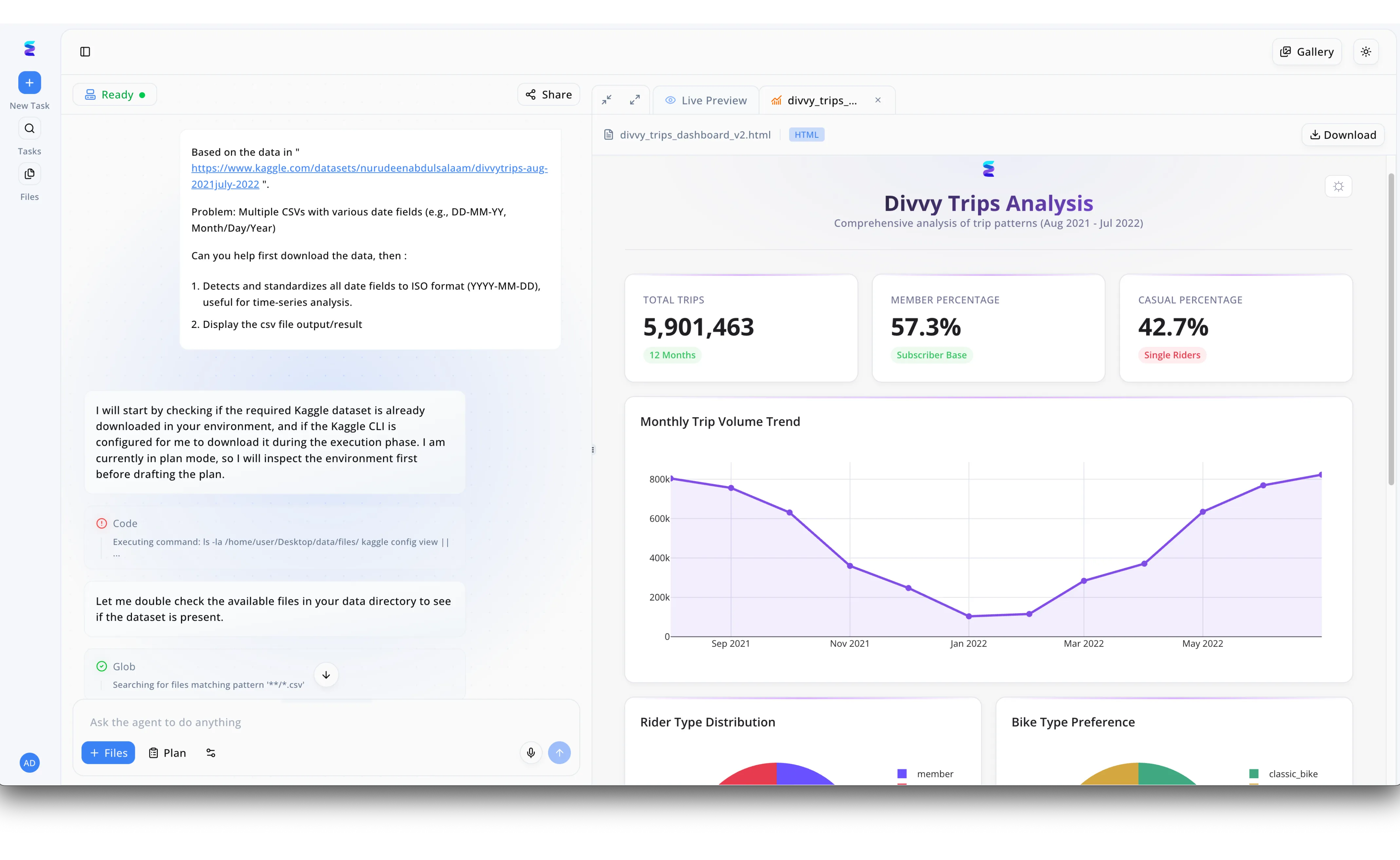
Energent.ai exemplifies how modern AI tools for line graphs can autonomously handle the entire pipeline from raw data ingestion to final visualization. As seen in the platform's split-screen workflow, a user simply provides a Kaggle dataset link in the chat interface and tasks the agent with standardizing inconsistent date fields into a uniform YYYY-MM-DD format. The agent's problem-solving process is completely transparent on the left, displaying specific execution steps like checking the Kaggle CLI environment and running glob commands to prep multiple CSVs for time-series analysis. The culmination of this automated data wrangling is rendered instantly in the right-hand Live Preview pane as a polished Divvy Trips Analysis dashboard. Dominating this dashboard is a precise Monthly Trip Volume Trend line graph that dynamically plots over 5.9 million total trips, proving the tool's ability to seamlessly turn messy data into clear temporal visualizations.
Other Tools
Ranked by performance, accuracy, and value.
Tableau Pulse
Automated Metrics for the Enterprise
The corporate data giant's sophisticated, highly-governed automated dashboard engine.
Microsoft Power BI Copilot
Native Generative BI
Your trusty corporate spreadsheet wizard evolved into an intelligent chatbot.
Julius AI
Conversational Data Science
A highly capable Python developer living inside your web browser.
ChatGPT Advanced Data Analysis
The Universal AI Sidekick
The ubiquitous AI assistant doing its absolute best with your everyday spreadsheets.
Polymer
Beautiful No-Code Dashboards
The sleek, user-friendly presentation maker of the data visualization world.
Akkio
Generative BI & Forecasting
A predictive crystal ball seamlessly layered over your pristine SQL tables.
Quick Comparison
Energent.ai
Best For: Enterprise Data Analysts
Primary Strength: Unstructured Document Parsing
Vibe: Elite Data Agent
Tableau Pulse
Best For: Salesforce Ecosystem Users
Primary Strength: Governed Enterprise BI
Vibe: Corporate Powerhouse
Microsoft Power BI Copilot
Best For: Microsoft 365 Enterprises
Primary Strength: DAX Generation
Vibe: Ecosystem Integrator
Julius AI
Best For: Researchers & Scientists
Primary Strength: Conversational Coding
Vibe: Python Co-pilot
ChatGPT Advanced Data Analysis
Best For: General Business Users
Primary Strength: Accessibility
Vibe: Universal Assistant
Polymer
Best For: Marketing Teams
Primary Strength: Aesthetic Presentation
Vibe: Design-First BI
Akkio
Best For: Agencies & Ops
Primary Strength: Predictive Forecasting
Vibe: Forecasting Engine
Our Methodology
How we evaluated these tools
We evaluated these AI line graph tools based on rigorously benchmarked data processing accuracy, the ability to ingest unstructured documents autonomously without coding, overall analytical depth, and the tangible daily hours saved for business data analysts. Extensive testing involved feeding each platform complex time-series data trapped across structured CSVs and complex, unstructured financial PDFs to assess practical enterprise utility.
- 1
Data Extraction & Processing Accuracy
Measures the mathematical precision of the AI when pulling data from source files into an analytical engine.
- 2
Unstructured Data Handling (PDFs, Images, Docs)
Assesses the capability to bypass pre-cleaned tables and directly read messy, multimodal enterprise documents.
- 3
Visualization Customization & Formatting
Evaluates the breadth of design options, axis controls, and stylistic outputs for generating presentation-ready line graphs.
- 4
Trend Analysis & Automated Insights
Gauges the tool's ability to natively interpret the line graph, automatically identifying anomalies, regressions, and key trends.
- 5
Ease of Use & Workflow Integration
Reviews the user interface friction, specifically focusing on no-code accessibility and deployment speed for non-technical users.
References & Sources
Financial document analysis accuracy benchmark on Hugging Face
Autonomous AI agents framework for complex software and data engineering tasks
Survey on the integration of autonomous agents across digital and analytical platforms
Research on parsing unstructured PDFs and visual data elements for downstream analysis
Evaluation of foundation models applied strictly to time-series forecasting and trend visualization
Frequently Asked Questions
AI tools automate the manual extraction, cleaning, and formatting of data, allowing analysts to transition from raw files to finished charts in minutes. This drastically reduces repetitive data entry and enables teams to focus strictly on high-level strategic interpretation.
Yes, advanced platforms utilizing multimodal parsing architectures can accurately read unstructured text and tables trapped within PDFs and images. Tools like Energent.ai specifically excel at extracting complex time-series data from messy layouts without requiring human intervention.
Energent.ai leverages specialized, benchmarked algorithms trained explicitly on complex enterprise and financial documents, achieving a proven 94.4% accuracy rate. This allows it to comprehend intricate multi-page document structures and nested tables far better than generalized conversational AIs.
No. The leading modern AI visualization platforms employ conversational, no-code interfaces that interpret natural language instructions to render complex line charts. The system writes and executes the necessary code entirely behind the scenes.
Top-tier AI platforms utilize contextual inference to flag missing values, remove duplicates, and interpolate minor data gaps based on historical trends. Users are proactively alerted to anomalies, ensuring the resulting line graph maintains high statistical integrity.
Absolutely. Leading AI data agents format their outputs to meet strict corporate design standards, exporting directly to high-resolution formats like PowerPoint or PDF. These visualizations feature precise axis labels, legends, and styling optimized for board-level review.
Turn Unstructured Data into Actionable Line Graphs
Join enterprise leaders like Amazon, AWS, and Stanford who save over 3 hours a day using Energent.ai's no-code analytics.